How to fix linux can't boot on ASUS ExpertBook B1402CBA
If you want ot boot any linux distros that use newer kernel (maybe 6.12+, or non-lts kernel) and your uefi firmware version is 314+ you may occur this bug. after grub is loaded and you choose linux boot selection, either from existing installation or from live session, it only throw endless blackscreen without any logs, meaning you can’t use shift or esc to see logs, and nomodeset didn’t works too.
The problem is, on firmware v314+, Intel IBT is interfering with linux boot capabilities making boot process failed very early, even failed to write a logs, i guess this bug isn’t nicely documented so i personally didn’t know what happening under-the-hood
We must disable Intel IBT for linux boot, here’s how to do it:
On Boot
- Press
eon GRUB boot selection - Add kernel parameter
ibt=offonlinux... quietline like this:
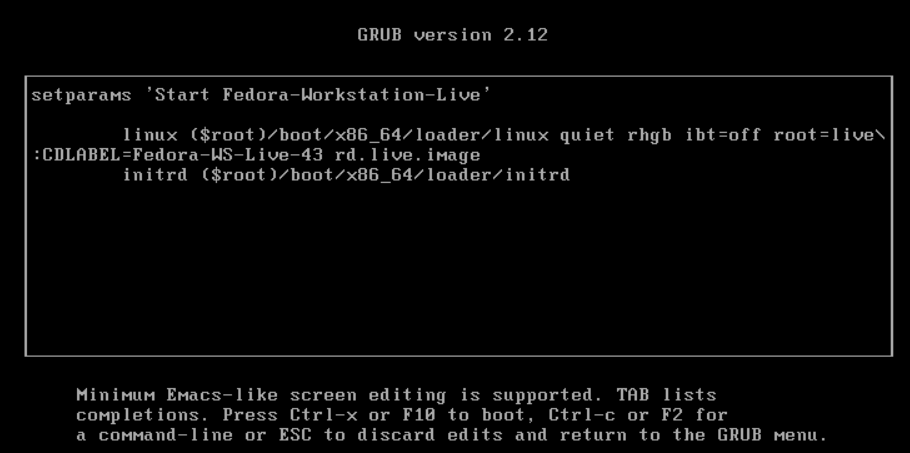
- Then press
Ctrl+XorF10to boot with newly specified kernel parameter
On /etc/default/grub
- Edit
/etc/default/grubwith this command:
sudo nano /etc/default/grub- Then add
ibt=offtoGRUB_CMDLINE_LINUXsection like this
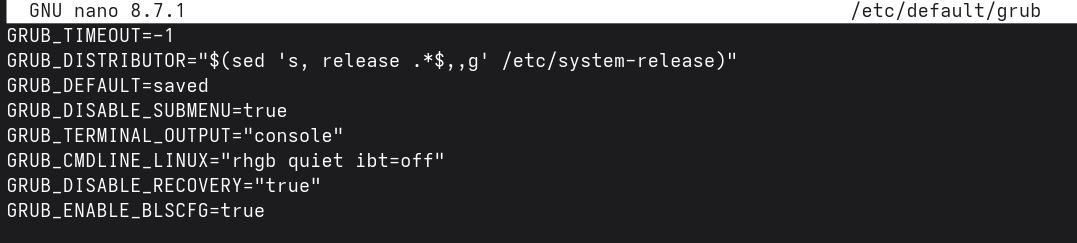
- Update GRUB configuration with this command
# Ubuntu/Debian based

sudo update-grub

# Fedora, RHEL-based, OpenSUSE

sudo grub2-mkconfig -o /boot/grub2/grub.cfg

# Arch-based

sudo grub-mkconfig -o /boot/grub2/grub.cfg
This should solve the problem of black screen when booting linux distros